Create an ABHA
Create a patient's ABHA number with an Aadhaar OTP after taking their consent.
An ABHA is a patient's Ayushman Bharat Health Account number. Creating one lets the patient's health records be linked and shared with their consent.
Who does this: registration desk · Where: Health Information Exchange › ABHA Creation
Create an ABHA
-
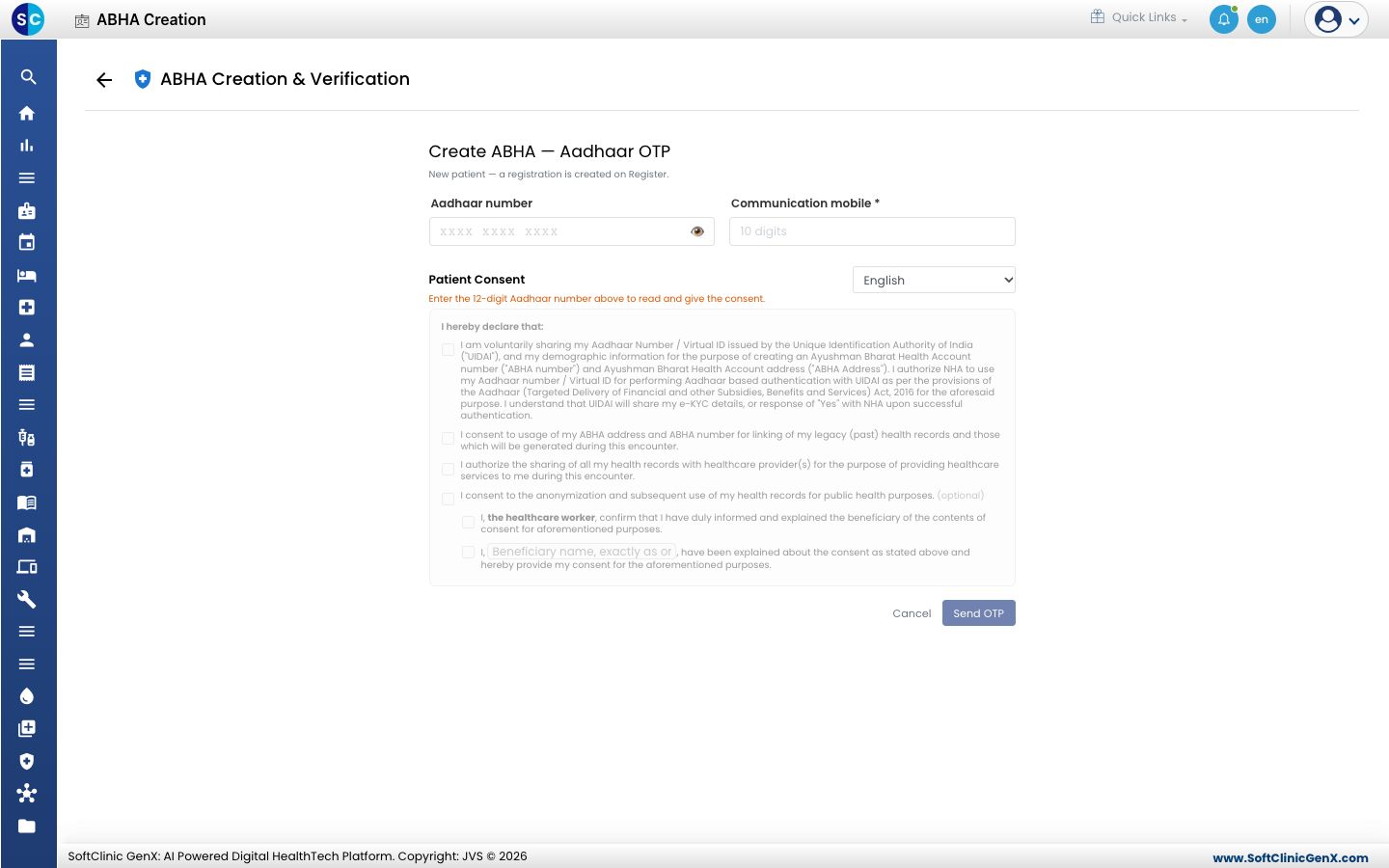
Open Health Information Exchange › ABHA Creation. The screen is titled ABHA Creation & Verification.
-
Enter the patient's 12-digit Aadhaar number and the Communication mobile. The mobile number is required.
-
Choose the language for the Patient Consent and let the patient read it. The consent boxes switch on once the Aadhaar number is entered.
-
Tick the consents the patient agrees to. The consent to use Aadhaar and to link records is needed; sharing for public health research is optional.
-
Click Send OTP. The patient receives an OTP on the mobile number linked to their Aadhaar, and you enter it to finish.
Good to know
- For a new patient, the registration is created on the Register screen as usual.
- Never take the consent on the patient's behalf. The patient must agree.
Related
- Verify an ABHA: check an ABHA the patient already has.
- Health Information Exchange FAQs: short answers about ABHA.