View the maintenance dashboard
See open, overdue and completed maintenance, asset downtime and the jobs that need attention.
The Maintenance Dashboard shows how maintenance is going across the hospital, and which jobs need attention first.
Who does this: biomedical in-charge · Where: Maintenance Management › Dashboard
Read the dashboard
-
Open Maintenance Management › Dashboard.
-
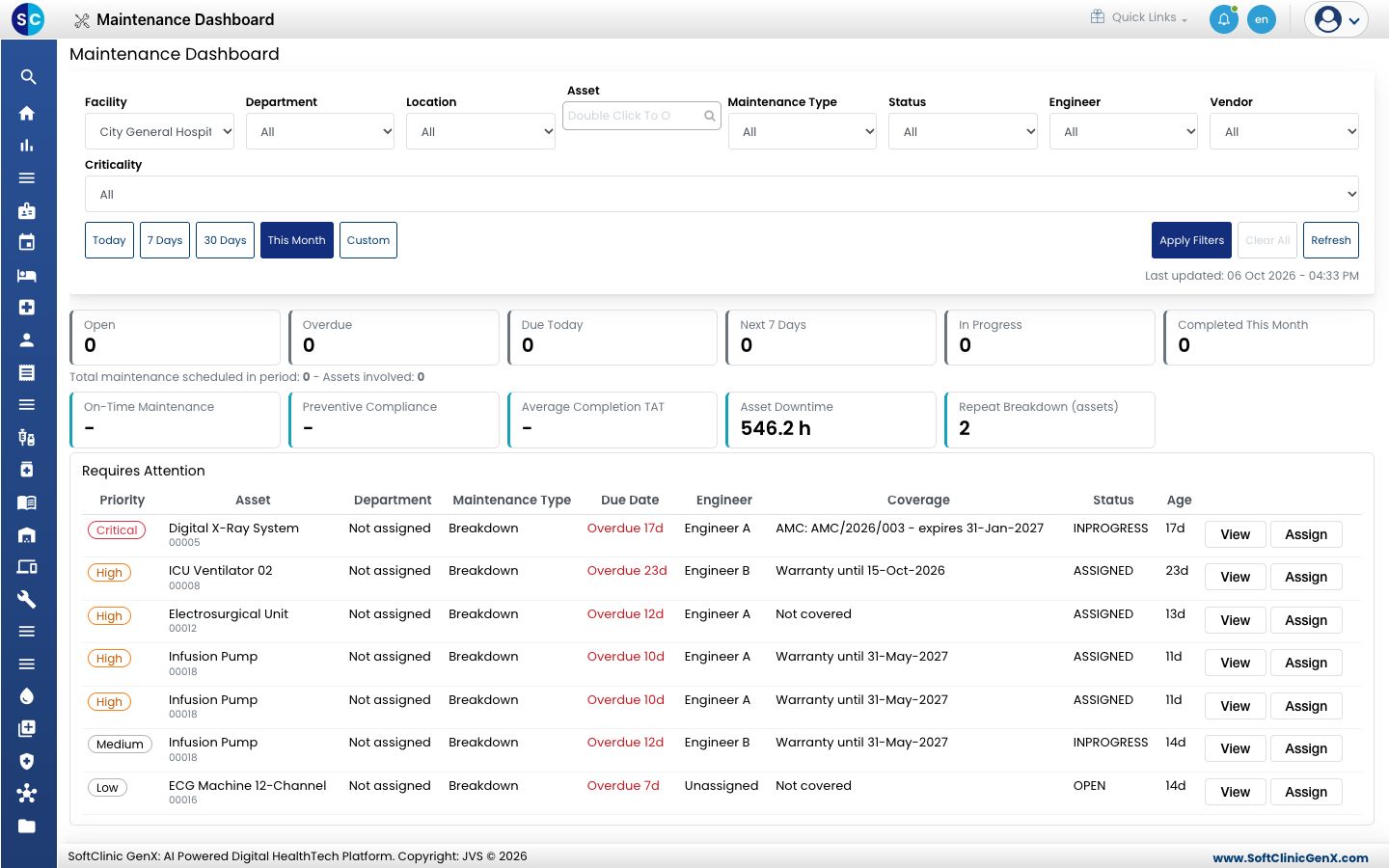
Use the filters at the top, Facility, Department, Location, Asset, Maintenance Type, Status, Engineer, Vendor and Criticality, then click Apply Filters. Use Today, 7 Days, 30 Days, This Month or Custom for the period, and Refresh to reload.
-
Read the tiles: Open, Overdue, Due Today, Next 7 Days, In Progress and Completed This Month. Below them are On-Time Maintenance, Preventive Compliance, Average Completion TAT, Asset Downtime and Repeat Breakdown (assets).
-
Requires Attention lists the jobs to act on first, with priority, asset, due date, engineer and warranty or AMC cover. Click View to open a job, or Assign to give it to an engineer.
Related
- Log a maintenance: record the work once it is done.
- Maintenance Management FAQs: short answers about maintenance.