View the asset dashboard
See how many assets are in service, under maintenance or out of service, and which need attention.
The Asset Management Dashboard gives a summary of all your equipment, so you can see at a glance what needs attention.
Who does this: biomedical or administration in-charge · Where: Asset Management › Dashboard
Read the dashboard
-
Open Asset Management › Dashboard.
-
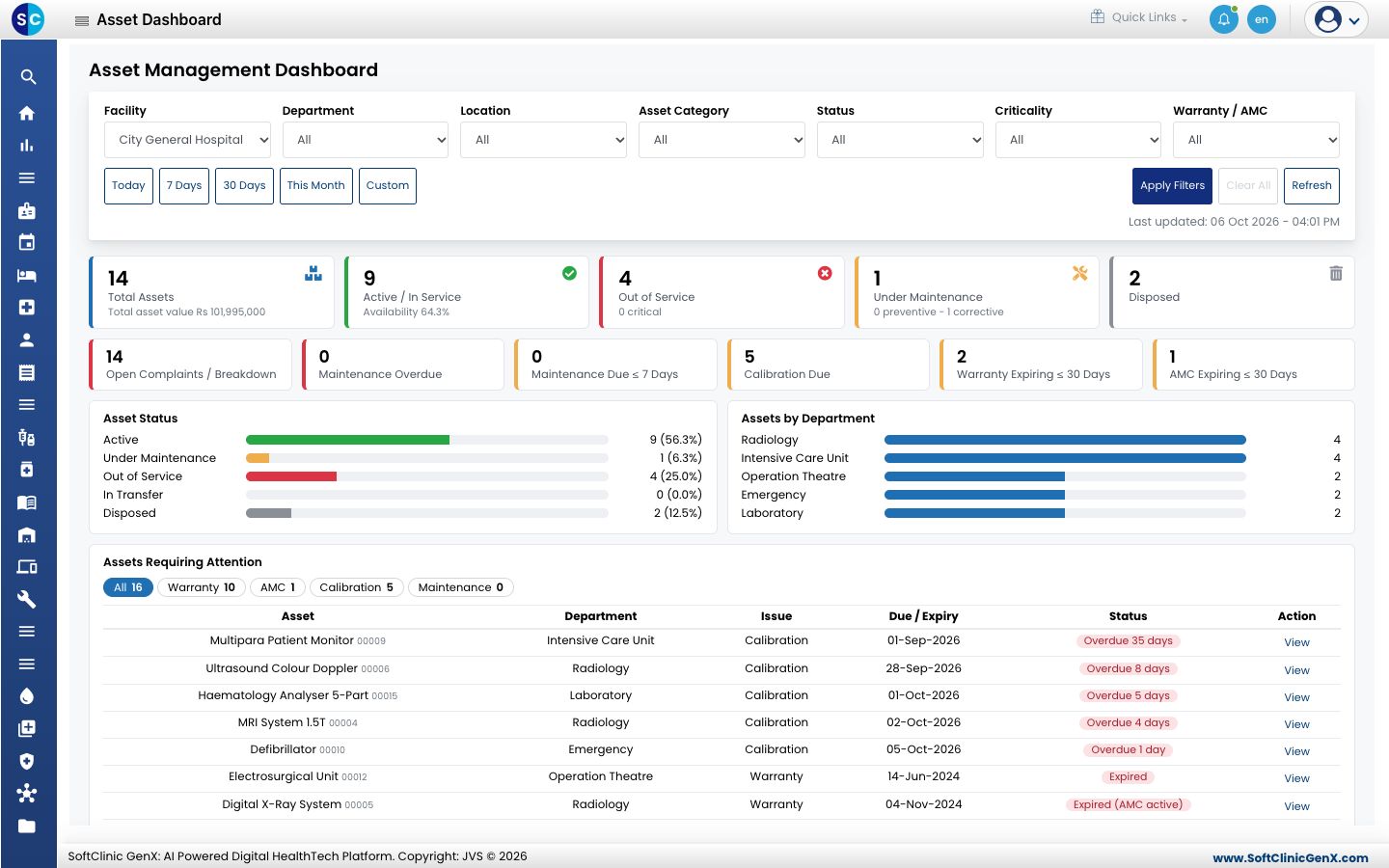
Use the filters at the top, Facility, Department, Location, Asset Category, Status, Criticality and Warranty / AMC, then click Apply Filters. Use the period buttons such as Today, 7 Days and 30 Days to change the dates. Click Refresh to reload.
-
Read the tiles: total assets and their value, assets in service, out of service and under maintenance, disposed assets, open complaints, overdue maintenance, calibrations due, and warranties and AMCs expiring in 30 days.
-
Asset Status and Assets by Department show the split as bars.
-
Assets Requiring Attention lists each asset with its issue, such as calibration, warranty or AMC, and the due date. Click View to open the asset. Use the tabs to filter by issue.
Related
- Track asset calibration: see calibration due dates.
- Record an AMC contract: record a contract.