Find a doctor's patients on the Nursing Dashboard
List the outpatient visits and admitted patients of one doctor, and open a patient's medical record.
The Nursing Dashboard lists patients by doctor. Pick a clinic and a doctor to see that doctor's outpatient visits for a date range, or the patients admitted under the doctor. Use it when you assist one doctor. To see patients by ward, use Ward Management.
note
Who can do this: nurses with Nursing Dashboard rights
Where: Nursing Work Bench › Nursing Dashboard
Before you start
- The patient has a visit or an admission with the doctor. See Admit a patient.
List a doctor's admitted patients
- Go to Nursing Work Bench › Nursing Dashboard.
- Check Hospital, then select the Department and the Clinic/Location.
- Select the doctor in Doctor Name.
- Under My Activities, click In-Patient. My Admission lists the patients admitted under that doctor, with admission number, CR number, name, admission date, ward and bed.
- Click the three dots at the end of a row and choose Continue Medical Records to open the patient's record for this stay.
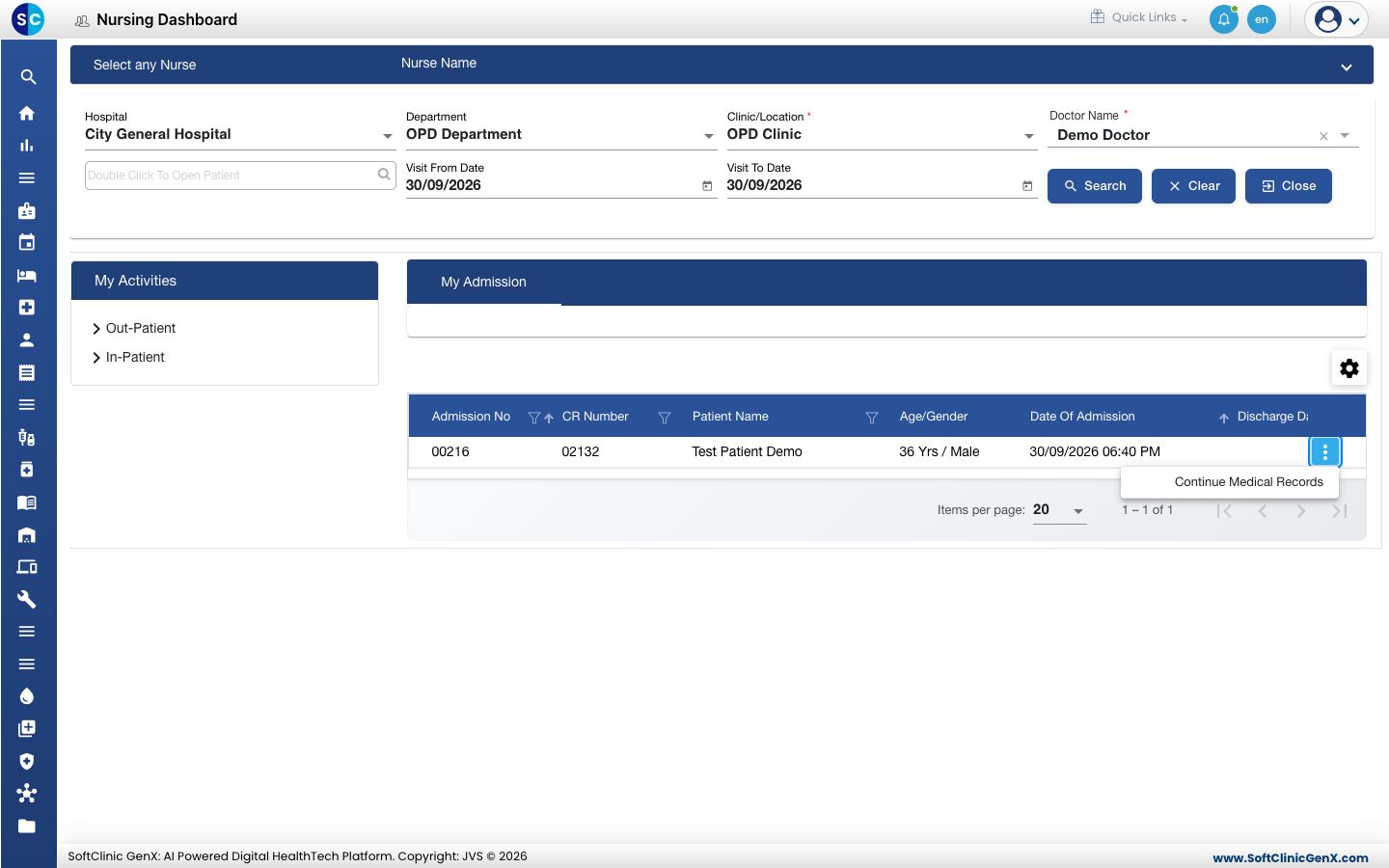
List a doctor's outpatient visits
- Select the Clinic/Location and the Doctor Name as above.
- Set Visit From Date and Visit To Date, then click Search.
- Under My Activities, click Out-Patient. The number beside it is the count of visits in the list.
Good to know
- Type a name or CR number in Double Click To Open Patient to narrow the list to one patient.
- Click the gear icon above the list to choose the columns you see.
- Click Clear to reset the filters.
Troubleshooting
| What you see | What it means | What to do |
|---|---|---|
| My Admission is empty | No doctor is selected, or the doctor has no admitted patient. | Select the Clinic/Location and the Doctor Name. |
| The doctor is not in Doctor Name | The doctor does not work in the selected clinic. | Select the doctor's clinic in Clinic/Location. |
| The outpatient list is empty | The dates do not cover the visit. | Widen Visit From Date and Visit To Date and click Search. |
Related
- See the patients in your ward: patients by ward and bed.
- Find an admitted patient: the full admission list.
- Nursing Work Bench FAQs: common questions on the Nursing Dashboard.