Add a treatment to the treatment plan
List the nursing treatments a patient needs, such as a dressing or a position change, with how often and from when.
The treatment plan lists the care an admitted patient needs that is not a medicine, for example a wound dressing or a position change. Each line has a frequency, a start date and instructions for the nurse. The plan also shows the patient's medicine orders, so the whole day's care is on one page.
note
Who can do this: doctors and ward staff with Ward Management rights
Where: Nursing Work Bench › Ward Management › three dots on the bed › Treatment Plan
Before you start
- The patient is admitted to a bed. See Admit a patient.
Add a treatment
- Go to Nursing Work Bench › Ward Management and find the patient's bed. See See the patients in your ward.
- Click the three dots on the bed card and choose Treatment Plan. Order Details opens. Click the Treatment Plan tab if it is not already open.
- Under Treatments, type the treatment in Treatment.
- Select the Frequency. Once daily is the default.
- Check Start and Start Time. Set Stop if the treatment ends on a known date.
- Type the instructions for the nurse in the box below.
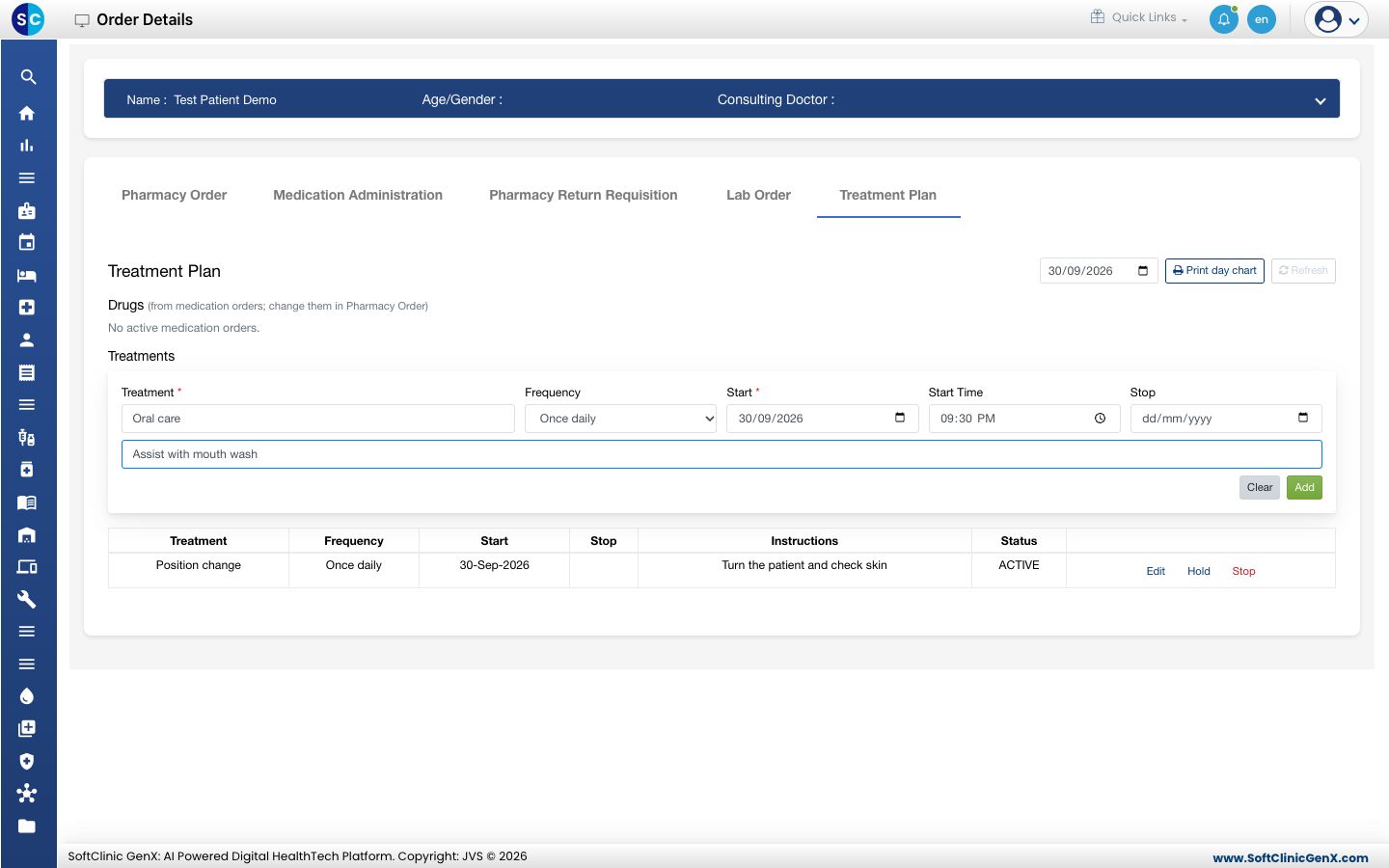
- Click Add. The treatment joins the list with Status ACTIVE.
Fields on the form
| Field | What to enter | Required |
|---|---|---|
| Treatment | What is to be done, up to 200 characters. | Yes |
| Frequency | How often. Once daily if you leave it. | No |
| Start | The first day of the treatment. | Yes |
| Start Time | The time of the first round. | No |
| Stop | The last day, if known. | No |
| Instructions for the nurse | How to do it, up to 300 characters. | No |
Change, hold or stop a treatment
- Edit: opens the line in the form. Change it and click Update.
- Hold: pauses the treatment. The system asks for a reason. Click Resume to restart it.
- Stop: ends the treatment. The system asks for a reason. A stopped line stays in the list.
Good to know
- The Drugs block lists the patient's medicine orders. Change them on the Pharmacy Order tab, not here.
- A new treatment shows to the ward nurse under New orders in SC Nursing, where the nurse acknowledges it.
- Pick a date and click Print day chart to print the plan for that day.
- The Treatment Plan tab of the Nursing Chart shows the same plan for reading only.
Troubleshooting
| What you see | What it means | What to do |
|---|---|---|
| Add is greyed out | Treatment or Start is empty. | Fill both fields. |
| Patient is discharged. The treatment plan is read-only. | The stay is closed. | No change can be made for this stay. |
| The treatment line could not be saved. Check the connection and try again. | The save did not reach the server. | Click Add again. |
Related
- Order medicines and tests from the ward: the other tabs of the same screen.
- Work through a patient's nursing to-do list: where the nurse sees the treatment.
- Nursing Work Bench FAQs: common questions on Ward Management.