See the patients in your ward
Open the ward board to see every bed, who is in it, and the nursing actions for each patient.
Ward Management is the ward board. It shows each bed of a ward as a card with the patient, the doctor and the length of stay. The three dots on a card open every nursing action for that patient.
note
Who can do this: nurses and ward staff with Ward Management rights
Where: Nursing Work Bench › Ward Management
Before you start
- The wards, rooms and beds exist. See Set up Bed Masters.
- The patient is admitted to a bed. See Admit a patient.
Open the ward board
- Go to Nursing Work Bench › Ward Management.
- Check Hospital and select the Ward. Select a Room to narrow the board to one room.
- Click Search. The beds with patients appear as cards.
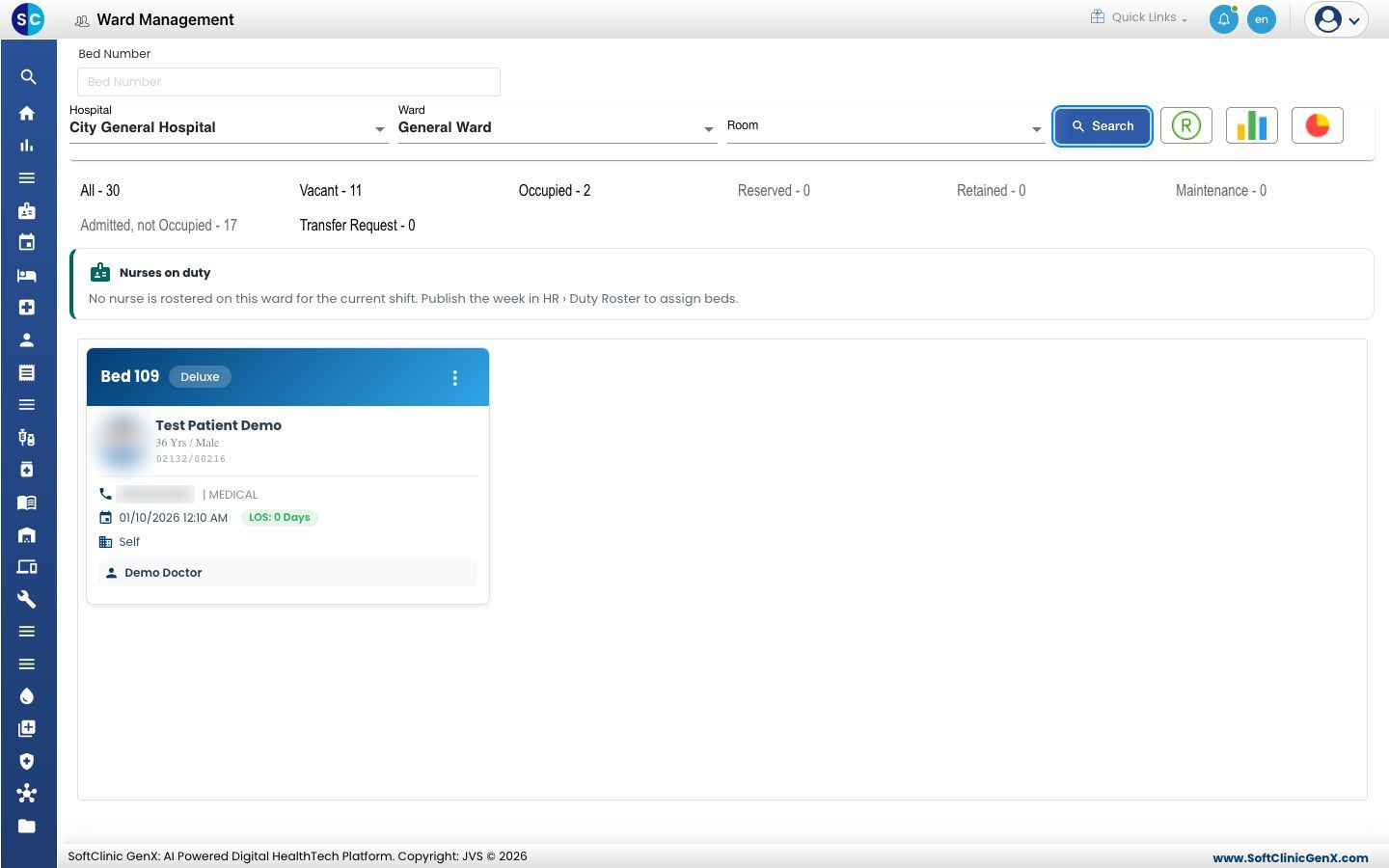
- Click a count above the board to change what is listed: All, Vacant, Occupied, Reserved, Retained, Maintenance, Admitted, not Occupied or Transfer Request.
- To jump to one bed, type its number in Bed Number at the top and pick it from the list.
Read a bed card
- Bed number and bed class: in the coloured header.
- Patient: name, age and gender, then the CR number and the admission number.
- Phone and visit type, the admission date, and LOS, the length of stay in days.
- Payer: Self or the organisation that pays.
- Doctors: the consultant, and the treating doctor when it is a different person.
Open a nursing action for a patient
- Click the three dots on the bed card.
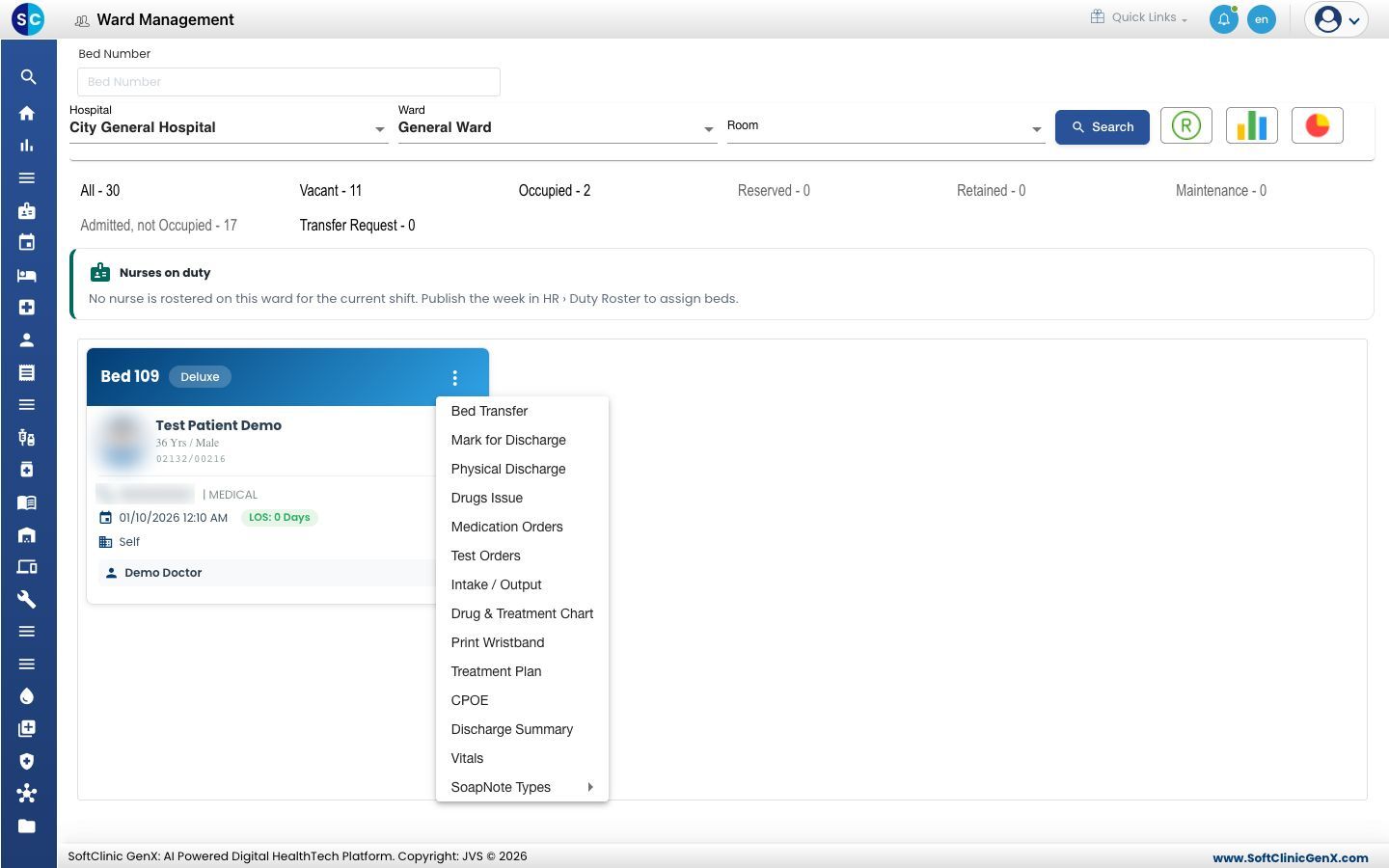
- Choose the action:
- Vitals: opens the Vital Data Sheet. See Record vitals.
- Intake / Output: opens the Nursing Chart. See Record intake and output.
- Drug & Treatment Chart: opens the Nursing Chart on Medication Administration.
- Medication Orders and Test Orders: see Order medicines and tests from the ward.
- Treatment Plan: see Add a treatment to the treatment plan.
- Bed Transfer: see Transfer a patient to another bed.
- Print Wristband: prints the patient's wristband again.
- SoapNote Types: opens Round Notes, OT Notes or General notes for the stay.
Assign beds to the nurses on duty
The Nurses on duty strip lists the nurses rostered on this ward for the current shift. Assign each occupied bed to a nurse on its card. A bed with no nurse shows to every nurse on the ward in SC Nursing.
Troubleshooting
| What you see | What it means | What to do |
|---|---|---|
| The board is empty and every count is 0 | Search is not clicked yet. | Select the Ward and click Search. |
| A ward, room or bed is missing | It is not set up, or it is inactive. | Add or activate it in Bed Masters. |
| No nurse is rostered on this ward for the current shift. Publish the week in HR › Duty Roster to assign beds. | No duty roster is published for this ward and shift. | Ask the nursing superintendent to publish the roster. Until then every nurse sees every bed. |
| A patient is missing from the board | The patient is in another ward, or the admission is cancelled. | Check the Admission List. |
Related
- Work through a patient's nursing to-do list: the bedside view of the same patients.
- See free and occupied beds: the admission desk's bed chart.
- Nursing Work Bench FAQs: common questions on Ward Management.