AI Scribe: record the consultation, get the note drafted
AI Scribe listens to the consultation, writes what was said as a live transcript, and drafts the SOAP note for you to check and add.
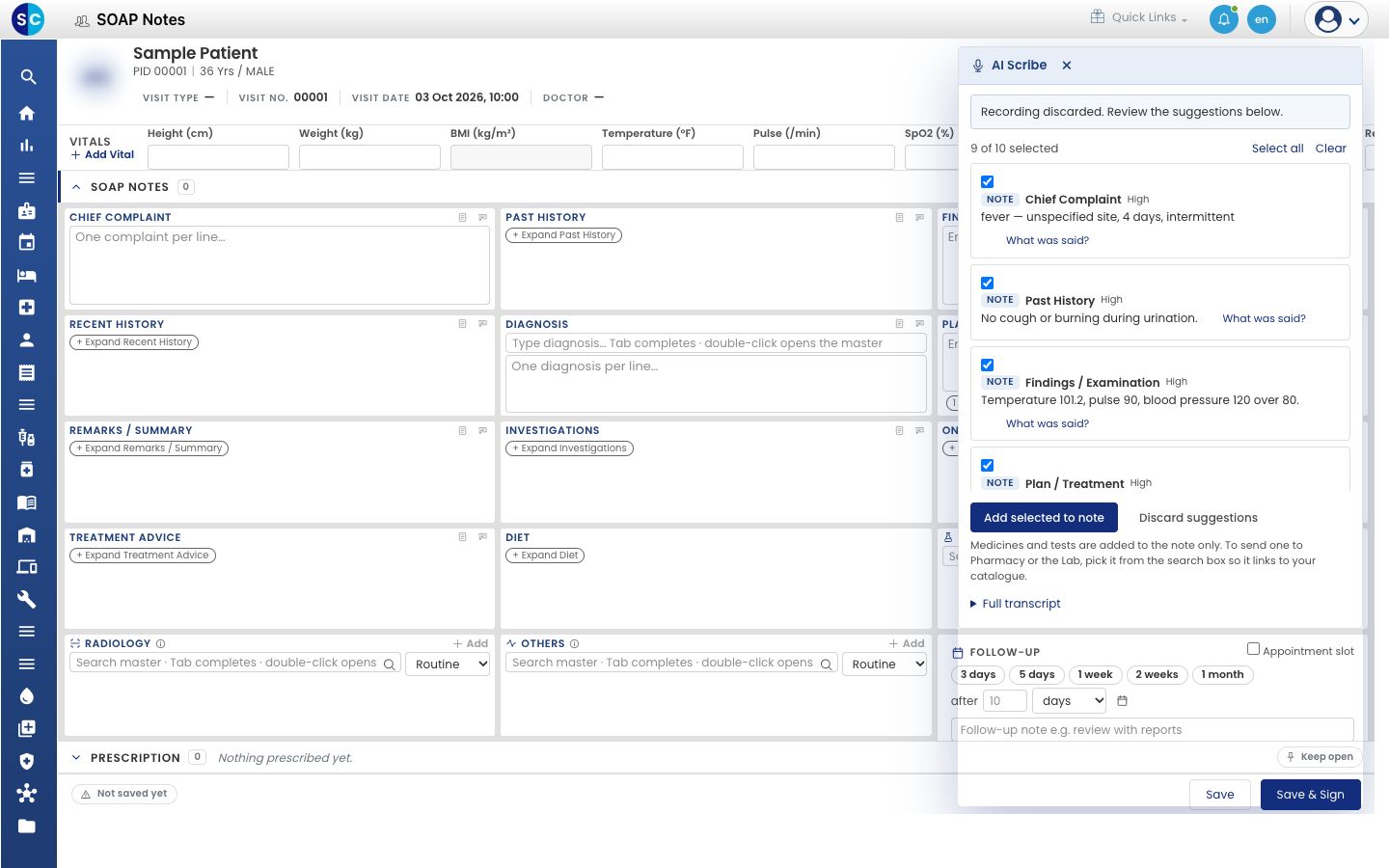
AI Scribe lets you talk to your patient instead of typing. It listens to the consultation, shows what was said as text while you talk, and when you finish it drafts the note: complaints, history, findings, diagnosis, medicines, tests and follow-up. You check each suggestion and choose what goes into the note. Nothing is added until you say so.
Who can use it: doctors on the new SOAP Notes consultation screen · Who sets it up: each doctor ticks one box in User Preferences; the hospital administrator publishes the privacy notice once
Where: the microphone button at the top of a patient's SOAP note
What AI Scribe does for you
| You say | AI Scribe offers |
|---|---|
| The patient's complaints and how long they have had them | Chief Complaint and history text for the note |
| Temperature, pulse, blood pressure | A Vital suggestion to read against the Vitals screen |
| What you find on examination | Findings / Examination text |
| The condition you suspect | A Diagnosis you can link to a code from your Diagnosis Master |
| Medicines, doses and how long to take them | Medicine suggestions, recorded on the note |
| Tests you want done | Investigations text |
| Symptoms the patient says they do not have | Denies lines in the history |
| When to come back | A Follow-up suggestion |
Every suggestion has a What was said? link that shows the exact words it came from, and a High, Medium or Low mark for how sure AI Scribe is.
What AI Scribe does not do
- It does not sign the note. You still use Save & Sign when you are done.
- It does not send a medicine to the pharmacy or a test to the lab. Suggestions are added to the note as text. To order, pick the item from the search box on the note.
- It does not replace what you have already typed. New text is added below it.
How to use it
Follow the guides in this order:
- Get ready to use AI Scribe: switch on the new SOAP Notes screen and check the privacy notice.
- Open AI Scribe on a patient's note: find the microphone button.
- Record a consultation: confirm consent, start, pause and finish.
- Choose the consultation language: tell AI Scribe which language you and the patient speak.
- Review the suggestions and add them to the note: check, tick, add and sign.
Questions? See the AI Scribe FAQs.