Smart Write: write by hand, get a typed record
Doctors and nurses write with a pen on a tablet, and GenX turns the handwriting into the typed visit note, IPD notes and orders.
Smart Write lets doctors and nurses keep writing the way they always have: with a pen, on a ruled page. The page is on a tablet in the GenX provider app. GenX reads your handwriting, sorts it into the right sections of the record and shows it to you as typed text. You check it, correct it and save it.
Who uses it: doctors and nurses on a tablet · Who switches it on: hospital administrator
Where: in the provider app, the Smart Write button on the SOAP note, and Smart Write Note and Sign Consent on an admitted patient
What Smart Write fills for you
| Where you write | What GenX fills |
|---|---|
| OPD visit note | Chief complaint, history, diagnosis with its code, medicines with dose, route, frequency and duration, and the follow-up date |
| IPD progress note (doctor) | The note text, and medicine orders that go to the pharmacy and the medication chart |
| IPD nursing note (nurse) | The note text |
| Discharge summary | A draft built from the admission's doctor and nursing notes, which the doctor reviews on the web |
| Consent | The hospital's consent form, signed on the tablet by the patient or attendant, with a witness |
You can mark a section before you write by tapping C/O, Rx, Hx or Dx at the top of the pad. You can also write the label on the page, for example "C/O:" or "Rx:", and GenX picks it up.
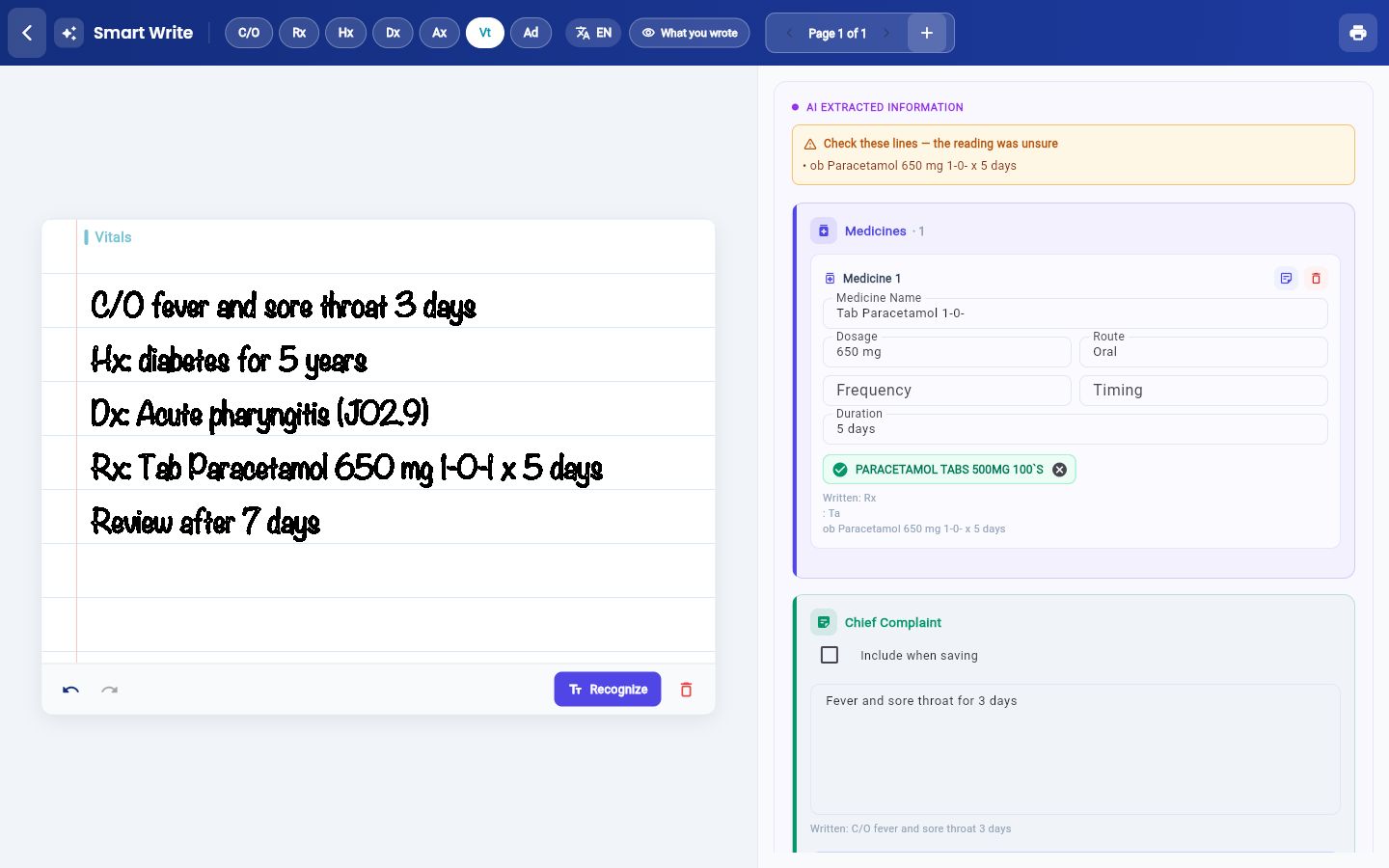
Your handwritten page stays in the record
The page you wrote is saved with the patient, not thrown away after reading.
- OPD: the page is saved to the patient's files. On the web SOAP note, it opens from the Files button.
- IPD: each note row on the web Nursing Notes list has a Page button that shows the page. Medicines ordered from a page show the same Page link on the Medication Administration chart.
- Consent: the signed form is saved as a PDF in the patient's documents.
Languages it reads
Choose the writing language on the pad before you write. The list has English, Hindi, Marathi, Gujarati, Bengali, Punjabi, Tamil, Telugu, Kannada and Malayalam.
You stay in control
- Nothing is saved until you press save. The typed reading sits beside your page so you can compare them line by line.
- Lines GenX was unsure about are listed at the top under Check these lines — the reading was unsure.
- You can edit every field. A medicine is saved only after you confirm its match in the hospital's drug list. A diagnosis is saved only after you confirm its match in the diagnosis master.
- What you wrote shows exactly what GenX read from the page, before it was sorted into sections.
What you need
- A tablet with a stylus, and the GenX provider app signed in with your own user.
- Smart Write switched on for the hospital. An administrator does this once (see below).
- For medicines and diagnoses to match, the hospital's drug list and diagnosis master must be set up. See Set up Diagnosis.
Switch Smart Write on
- Go to Configurations › Application Settings › System Settings.
- Tick Smart Write. The setting is highlighted below.
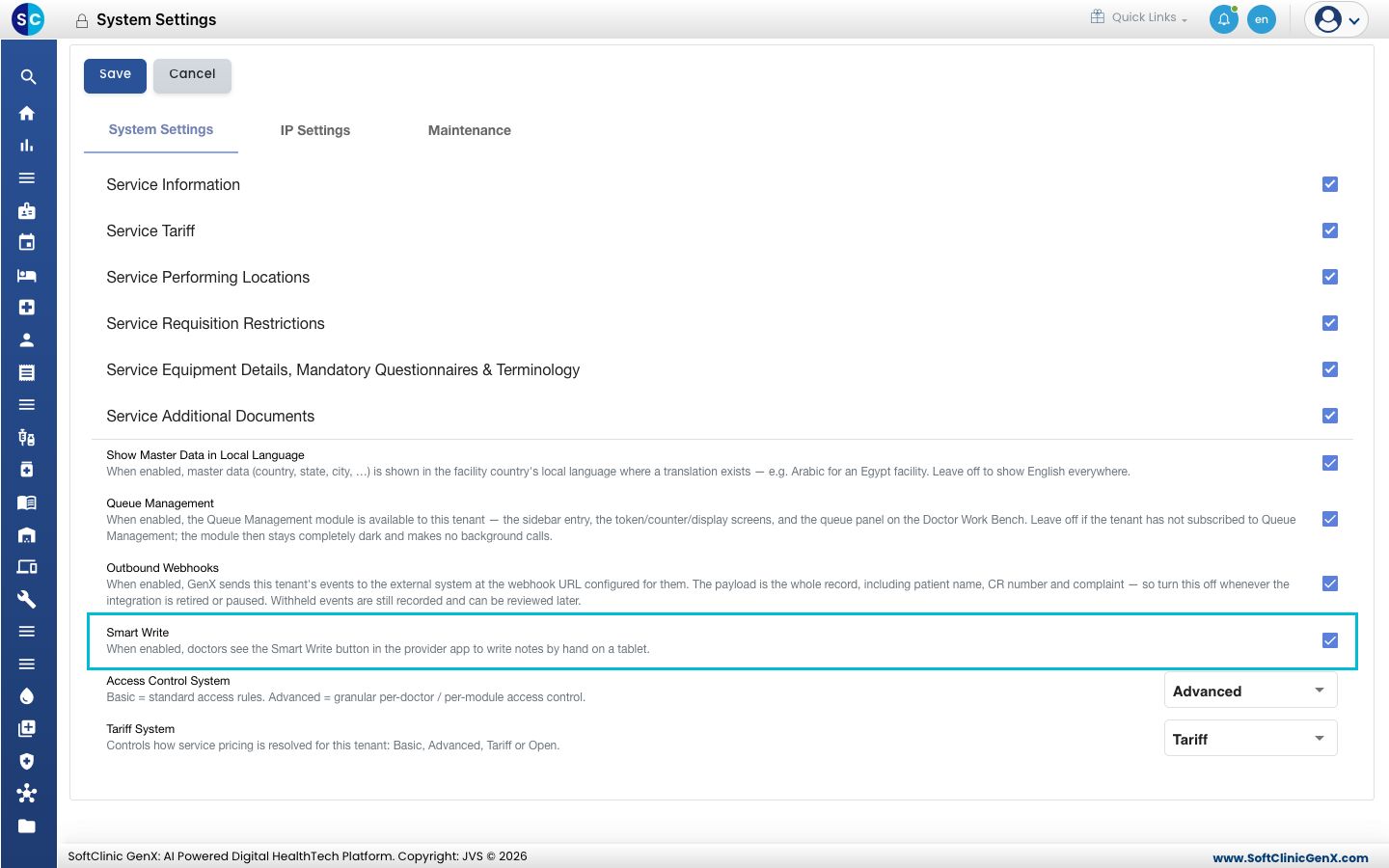
- Click Save at the top of the page.
Doctors then see the Smart Write button on the SOAP note in the provider app. Untick it to hide the button for everyone in the hospital.
Step-by-step guides
- Write a visit note by hand: OPD notes, diagnosis, medicines and the prescription print.
- Write IPD notes by hand: progress notes, nursing notes and medicine orders for an admitted patient.
- Draft a discharge summary from the notes: a first draft built from the admission's notes.
- Take consent on the tablet: signature or thumb impression with a witness.
Questions? See the Smart Write FAQs.